
General information about e-Residency is available at e-Residency Portal
Association with an existing legal person
If your data on the registry card of the legal person has foreign personal code or a birth date, but you have logged into the portal using your e-Residency card, you will not see the company listed in “My dashboard”.
To see the related company on the “My dashboard” page you should start an entry of the amendment to change your birth date/foreign personal code through e-Business Portal.
To do this: After logging in with your e-Residency card (or Smart-ID), go to the front page and select „My dashboard“.
From the left menu click on "Additional actions" and then click on the "Refresh connections" button.
After clicking on "Refresh connections", the system will search for persons in the register that do not have estonian ID code and whose first and last name are the same as the e-resident who has logged in.

Then, a list of found legal entities will be displayed, with a "Link" button next to it. To link, select the legal entity related to you and click the "Link" button at the end of the line and you will be taken to the application creation view.
If the changes are correct, you can sign the application at the confirmation stage by clicking the "Sign" button.
The application for only linking the e-resident has no state fee.
The application must be submitted to the registrar by pressing the "Submit application" button.
According to the application and the type of legal entity, the registrar reviews the application and makes changes within 1-5 working days.
If for some reason no connections are found (e.g. the name is slightly different), you should click on the "Search for a legal person" link in the lower left menu of the dashboard.
Then, from the left-side menu, click on the link „Search for a legal person“:
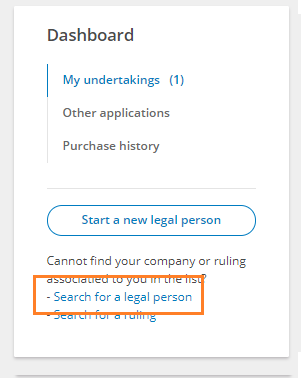
Find a legal person by registry code or name:

In the results found, press on the company's name and then "Change data". Confirm your choice.
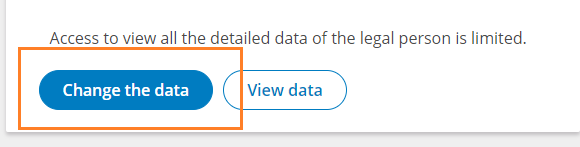
The board member's personal code can be changed in the "Persons" section. Press the "Change" button behind the board member's name, select the country of personal identification number Estonia, then replace the date of birth/personal identification number of a foreign country with the personal identification number of Estonia. Then save and continue.
In the "Documents" section, add a document, for example a free-form letter with a desire to replace the date of birth of the board member and shareholder (in one person) with the Estonian personal identification number. The document should be digitally signed. Select "Resolution of the Body" as the document type and then proceed.
Once the changes have been added, you can sign the application at the confirmation stage by pressing the "Sign" button.
Changing the personal identification number is free of state fee. If you are still directed to pay, you can make a choice and confirm that there is no state fee to be paid for the operation.
The application must be submitted to the registrar by pressing the "Submit application" button.
According to the application and the type of legal entity, the registrar reviews the application and makes changes within 1-5 working days.